
blog
News & Updates

How a “CEO can’t send email” ticket turned into a two-day Fail2ban migration
Last week I got a message that the CEO at one of our client sites couldn't send or receive email when he was in the office. Anywhere else, everything worked. Same laptop, same account, same server. Only on the office LAN did mail just... not go anywhere. I've seen...

When TLS Breaks Silently: A Mail Server Rescue Story
A real-world troubleshooting session on a Rocky Linux 10.2 iRedMail server running under KVM The Setup A small mail server hosted on a KVM virtualization host. The host runs Rocky Linux 10.2 and manages two bridges: one for the public-facing network and one for the...
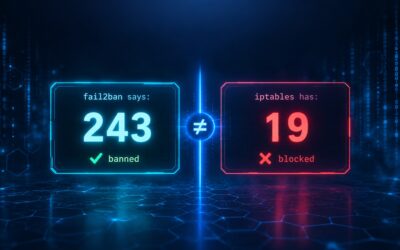
The 556 Bans That Didn’t Block: How We Found Silent fail2ban Failures on 3 of Our 4 Servers
We thought our servers were protected. fail2ban showed hundreds of banned IPs. Then we ran one command and discovered most of those bans weren't enforced at all. Here's how we found the silent failure, why it happens, and how to check your own servers. The Setup We...

How We Took Our Mail Server from Constant SSH Attacks to Peace and Quiet
TL;DR: We layered fail2ban, CrowdSec, and firewalld with a strict whitelist, eliminated self-lockout risk, and stopped manually blocking IPs. Here's the full story. The Problem Our Rocky Linux 10 mail server (running iRedMail) was under constant SSH brute-force...

The Ultimate Guide to Email Security: SPF, DKIM, DMARC, BIMI, MTA-STS, and TLS-RPT
Email authentication transforms a vulnerable mail server into a secure, trusted sender. When operating a self-hosted mail server on a Linux distribution like Ubuntu or Red Hat, implementing the full suite of authentication protocols is mandatory for reliable inbox...

How to Create Ultra-Realistic Videos with SadTalker
A Professional's Guide to AI-Powered Talking Head Generation After extensive testing and overcoming the challenges of getting SadTalker working, I've compiled this professional guide to help you produce the highest quality talking head videos possible. SadTalker is an...

The Complete, Battle-Tested Guide to SadTalker
From Zero to Realistic Talking Head Videos After countless errors, dependency hell, and a successful final render, I've documented the entire process to save you from the pain we went through. This is the guide I wish I had. What is SadTalker? SadTalker is an...
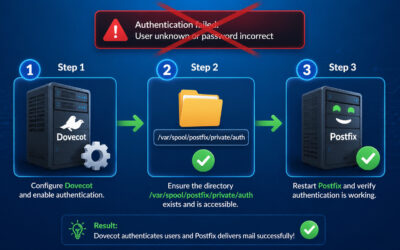
Fixing the “SASL: Connect to Dovecot Auth Socket Failed” Error
A step-by-step guide to resolving one of the most common Postfix + Dovecot integration issues If you're running a mail server with Postfix and Dovecot, you've likely encountered this frustrating error in your mail logs: warning: sasl: connect to dovecot auth socket...

Mail Server Hardening – Securing iRedMail Against Modern Attacks
Table of Contents Introduction Understanding Modern Email Attacks Initial iRedMail Security Review Postfix Hardening Dovecot Security Firewall Strategy Advanced Fail2Ban Configuration Automated Subnet Blocking for Mail Services Roundcube Webmail Security Monitoring...

Securing Your Red Hat, CentOS, Rocky Linux 10.2 KVM Host Server – A Complete Hardening Guide
Table of Contents Introduction Initial Server Hardening SSH Security Firewall Configuration Fail2Ban Setup Automated Subnet Blocking KVM-Specific Security Monitoring and Maintenance Conclusion Introduction Running a KVM host server with multiple virtual machines...

SELinux: Fix ‘Permission denied’ for swtpm (libvirt TPM Emulator) on Rocky Linux 10
KVM virtual machines won't start with "cannot execute binary /usr/bin/swtpm: Permission denied"? Learn how to fix SELinux blocking swtpm (TPM emulator) in 5 minutes. Complete guide with multiple solutions. You've just rebooted your KVM host after an upgrade, and your...
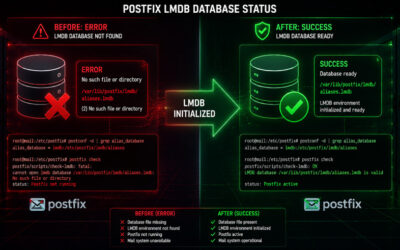
Postfix Postscreen Error: How to Fix ‘No such file or directory’ for LMDB Maps
Postfix postscreen failing with "error: open database …lmdb: No such file or directory"? Learn why this happens and how to fix it permanently in 2 minutes. Complete guide with scripts. You've just fixed the Postfix hash: to lmdb: conversion, but now you see this in...