
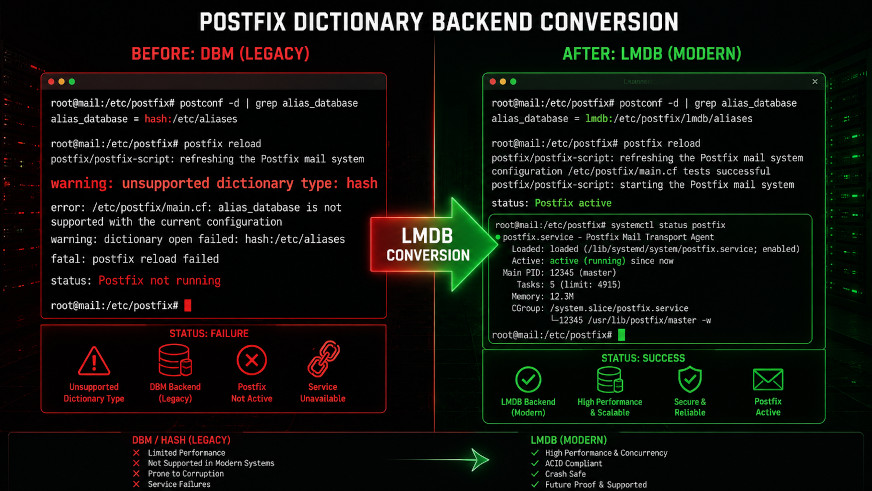
Upgraded to Rocky Linux 10 and Postfix is failing with "unsupported dictionary type: hash"? Learn how to convert hash maps to LMDB in 5 minutes. Complete guide with scripts.
You've just upgraded your mail server to Rocky Linux 10. Everything seemed fine until you checked your mail logs:
warning: unsupported dictionary type: hash. Is the postfix-hash package installed?
error: unsupported dictionary type: hash
fatal: lmdb lookup error
Your heart sinks. Emails aren't flowing. What went wrong?
The short answer: Rocky Linux 10 has removed Berkeley DB (BDB) support, which Postfix used for its hash: map type. The replacement is LMDB (Lightning Memory-Mapped Database).
The good news: The fix takes less than 5 minutes and doesn't require reinstalling anything.
In this guide, I'll show you exactly how to:
- ✅ Convert all
hash:maps tolmdb: - ✅ Fix
texthash:references - ✅ Rebuild your database files
- ✅ Verify everything works
What you'll need:
- Root or sudo access
- 5 minutes of time
- A backup of your Postfix configuration (always a good idea)
Prerequisites
# Verify your Rocky Linux version
cat /etc/rocky-release

# Check your Postfix version
postconf mail_version

# Make a backup before starting
sudo cp /etc/postfix/main.cf /etc/postfix/main.cf.bak
sudo cp /etc/postfix/master.cf /etc/postfix/master.cf.bak
Why This Happens
| Old System (Rocky 8/9) | New System (Rocky 10) |
|---|---|
| Berkeley DB (BDB) supported | BDB removed |
Postfix used hash: maps | Postfix must use lmdb: |
postfix-hash package available | Package does not exist |
Map files end with .db | Map files end with .lmdb |
The fix: Replace every occurrence of hash: with lmdb: in your Postfix configuration.
Step-by-Step Fix
Step 1: Install LMDB Support
# Install the postfix-lmdb package
sudo dnf install postfix-lmdb -y

# Verify it's installed
rpm -qa | grep postfix-lmdb
Step 2: Find All Hash References
# Find where hash is used in your configuration
sudo grep -r "hash:" /etc/postfix/main.cf /etc/postfix/master.cf
Typical output:
/etc/postfix/main.cf:smtpd_helo_restrictions = permit_mynetworks, permit_sasl_authenticated, check_helo_access hash:/etc/postfix/helo_access, reject_invalid_helo_hostname, reject_non_fqdn_helo_hostname
/etc/postfix/main.cf:postscreen_dnsbl_reply_map = texthash:/etc/postfix/postscreen_dnsbl_reply
/etc/postfix/master.cf:  -o smtpd_client_restrictions=check_client_access hash:/etc/postfix/legacy_clients,reject
Step 3: Convert main.cf
# Edit main.cf
sudo nano /etc/postfix/main.cf
Find and replace:
| Old | New |
|---|---|
hash: | lmdb: |
texthash: | lmdb: |
Example changes:
# Before
smtpd_helo_restrictions = permit_mynetworks, permit_sasl_authenticated, check_helo_access hash:/etc/postfix/helo_access, reject_invalid_helo_hostname, reject_non_fqdn_helo_hostname

# After
smtpd_helo_restrictions = permit_mynetworks, permit_sasl_authenticated, check_helo_access lmdb:/etc/postfix/helo_access, reject_invalid_helo_hostname, reject_non_fqdn_helo_hostname
# Before
postscreen_dnsbl_reply_map = texthash:/etc/postfix/postscreen_dnsbl_reply
# After
postscreen_dnsbl_reply_map = lmdb:/etc/postfix/postscreen_dnsbl_replyStep 4: Convert master.cf
sudo nano /etc/postfix/master.cfFind and replace:
# Before
  -o smtpd_client_restrictions=check_client_access hash:/etc/postfix/legacy_clients,reject

# After
  -o smtpd_client_restrictions=check_client_access lmdb:/etc/postfix/legacy_clients,reject
Step 5: Also Check for These Common Maps
# Look for these in your main.cf
# - alias_maps
# - alias_database
# - virtual_alias_maps
# - relay_recipient_maps
# - canonical_maps
# - sender_canonical_maps
# - recipient_canonical_maps

# Example conversion
alias_maps = lmdb:/etc/postfix/aliases
alias_database = lmdb:/etc/postfix/aliases
Step 6: Remove Old Database Files
# Remove all old .db files (Berkeley DB)
sudo rm -f /etc/postfix/*.db

# Remove any old .lmdb files (to start fresh)
sudo rm -f /etc/postfix/*.lmdb
Step 7: Rebuild All Maps
# Rebuild aliases database
sudo postalias lmdb:/etc/postfix/aliases

# Rebuild helo_access if it exists
if [ -f /etc/postfix/helo_access ]; then
    sudo postmap lmdb:/etc/postfix/helo_access
fi

# Rebuild legacy_clients if it exists
if [ -f /etc/postfix/legacy_clients ]; then
    sudo postmap lmdb:/etc/postfix/legacy_clients
fi

# Rebuild postscreen_dnsbl_reply if it exists
if [ -f /etc/postfix/postscreen_dnsbl_reply ]; then
    sudo postmap lmdb:/etc/postfix/postscreen_dnsbl_reply
fi

# Create empty file if it doesn't exist (to prevent errors)
sudo touch /etc/postfix/postscreen_dnsbl_reply
sudo postmap lmdb:/etc/postfix/postscreen_dnsbl_reply
Step 8: Restart Postfix
sudo systemctl restart postfixStep 9: Verify No Errors
# Check Postfix status
sudo systemctl status postfix --no-pager

# Look for hash-related errors
sudo tail -20 /var/log/maillog | grep -i "hash\|unsupported"

# Expected: No output (errors are gone)
Complete One-Liner Conversion Script
Save this as fix-postfix-lmdb.sh:
#!/bin/bash
# Postfix Hash to LMDB Conversion Script for Rocky Linux 10
# Run as root

set -e

echo "=== Postfix LMDB Conversion Script ==="

# Backup
echo "Creating backups..."
sudo cp /etc/postfix/main.cf /etc/postfix/main.cf.bak.$(date +%Y%m%d)
sudo cp /etc/postfix/master.cf /etc/postfix/master.cf.bak.$(date +%Y%m%d)

# Install LMDB support
echo "Installing postfix-lmdb..."
sudo dnf install postfix-lmdb -y

# Convert hash to lmdb
echo "Converting configuration files..."
sudo sed -i 's/hash:/lmdb:/g' /etc/postfix/main.cf
sudo sed -i 's/texthash:/lmdb:/g' /etc/postfix/main.cf
sudo sed -i 's/hash:/lmdb:/g' /etc/postfix/master.cf

# Remove old databases
echo "Removing old database files..."
sudo rm -f /etc/postfix/*.db
sudo rm -f /etc/postfix/*.lmdb

# Rebuild maps
echo "Rebuilding maps..."
sudo postalias lmdb:/etc/postfix/aliases

for map in helo_access legacy_clients postscreen_dnsbl_reply; do
    if [ -f /etc/postfix/$map ]; then
        sudo postmap lmdb:/etc/postfix/$map
    else
        sudo touch /etc/postfix/$map
        sudo postmap lmdb:/etc/postfix/$map
    fi
done

# Restart Postfix
echo "Restarting Postfix..."
sudo systemctl restart postfix

# Verify
echo "=== Verification ==="
sudo systemctl status postfix --no-pager | head -5
echo ""
echo "Checking for errors..."
sudo tail -10 /var/log/maillog | grep -i "hash\|unsupported" || echo "✅ No hash errors found!"

echo "=== Done ==="
Make it executable and run:
chmod +x fix-postfix-lmdb.sh
sudo ./fix-postfix-lmdb.sh
Verification Checklist
Run these commands to ensure everything is working:
# 1. Check Postfix status
sudo systemctl status postfix --no-pager
# Expected: active (running)

# 2. Check supported map types
sudo postconf -m | grep lmdb
# Expected: lmdb (hash should NOT be listed)

# 3. Check for hash errors in logs
sudo grep -i "unsupported" /var/log/maillog | tail -5
# Expected: No output or only old entries

# 4. Test email flow
echo "Test email" | mail -s "LMDB Test" your-email@example.com
# Expected: Email delivered

# 5. Check if Postfix is listening
sudo ss -tlnp | grep master
# Expected: Port 25, 465, 587 listening
Troubleshooting
Error: "open database /etc/postfix/xxx.lmdb: No such file or directory"
Fix:
sudo touch /etc/postfix/xxx
sudo postmap lmdb:/etc/postfix/xxx
sudo systemctl restart postfix
Error: "postmap: warning: lmdb:/etc/postfix/xxx is unavailable"
Fix:
sudo postmap lmdb:/etc/postfix/xxx
sudo systemctl restart postfix
Postfix Won't Start After Changes
Fix:
# Check configuration syntax
sudo postfix check

# If errors, restore from backup
sudo cp /etc/postfix/main.cf.bak /etc/postfix/main.cf
sudo cp /etc/postfix/master.cf.bak /etc/postfix/master.cf
sudo systemctl restart postfix
Still Seeing "unsupported dictionary type: hash"
Fix:
# Double-check all files
sudo grep -r "hash:" /etc/postfix/ --include="*.cf"

# If found in other files (e.g., .cf.bak), ignore them
# Only active .cf files matter
What About Other Map Types?
| Map Type | Status in Rocky Linux 10 | Replacement |
|---|---|---|
hash: | ❌ Removed | lmdb: |
btree: | ❌ Removed | lmdb: |
sdbm: | ❌ Removed | lmdb: |
cdb: | ✅ Still works | N/A |
lmdb: | ✅ Native | N/A |
regexp: | ✅ Works | N/A |
pcre: | ✅ Works | N/A |
Prevention: Avoid Future Map Issues
# Add to your monitoring
sudo tee /usr/local/bin/check-postfix-maps.sh > /dev/null << 'EOF'
#!/bin/bash
# Daily check for hash references

if grep -r "hash:" /etc/postfix/*.cf 2>/dev/null | grep -v ".bak"; then
    echo "WARNING: hash: references found in Postfix config"
    grep -r "hash:" /etc/postfix/*.cf | grep -v ".bak"
    exit 1
else
    echo "OK: No hash references found"
    exit 0
fi
EOF

sudo chmod +x /usr/local/bin/check-postfix-maps.sh

# Add to crontab
sudo crontab -e
# Add: 0 9 * * * /usr/local/bin/check-postfix-maps.sh
Conclusion
You've successfully converted your Postfix configuration from deprecated hash: maps to modern lmdb: maps.
What you've accomplished:
- ✅ Installed
postfix-lmdbpackage - ✅ Converted all
hash:andtexthash:references tolmdb: - ✅ Rebuilt all database files
- ✅ Eliminated all "unsupported dictionary type" errors
- ✅ Your mail server is now fully compatible with Rocky Linux 10